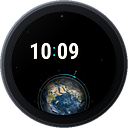
 Blue Beauty Earth Digital
Requirements
Blue Beauty Earth Digital is a watch face for Garmin watches with a round AMOLED or MicroLED display. This page lists what it needs and what each feature depends on, so you know before you buy.
At a glance
- A supported watch from the list below, with its current software.
- The Garmin Connect app on your phone, to install the face from the Connect IQ Store and to change its settings. The phone also brings the weather and your notifications to the watch.
- No additional hardware. You don’t need a chest strap, an external sensor or a companion app. Everything the face shows comes from the watch itself or through Garmin Connect.
- A touchscreen is a plus, not a must. It adds two shortcuts: holding a data field opens the matching widget of your watch, and the on-watch color picker follows your finger. Every setting also works with the buttons.
Supported watches
Every watch below runs the complete face. The columns list the few data fields that depend on a sensor or mode that not every watch has. Where a watch lacks one, the settings on the watch don’t offer it.
| Watch | Display (px) | Connect IQ | Floors, ascent | Elevation | Air pressure | Recovery time | Wheelchair |
|---|---|---|---|---|---|---|---|
| Approach® S50 | 390 x 390 | 5.1 | – | – | – | – | – |
| Approach® S70 42mm | 390 x 390 | 5.1 | ✓ | ✓ | ✓ | ✓ | – |
| Approach® S70 47mm | 454 x 454 | 5.1 | ✓ | ✓ | ✓ | ✓ | – |
| Approach® S72 43mm | 416 x 416 | 6.0 | ✓ | ✓ | ✓ | ✓ | – |
| Approach® S72 47mm | 454 x 454 | 6.0 | ✓ | ✓ | ✓ | ✓ | – |
| D2™ Mach 1 | 416 x 416 | 5.2 | ✓ | ✓ | ✓ | ✓ | – |
| D2™ Mach 2 | 454 x 454 | 5.2 | ✓ | ✓ | ✓ | ✓ | – |
| D2™ Mach 2 Pro | 454 x 454 | 6.0 | ✓ | ✓ | ✓ | ✓ | – |
| Descent™ G2 | 390 x 390 | 5.1 | ✓ | ✓ | ✓ | ✓ | – |
| Descent™ Mk3 43mm / Mk3i 43mm | 390 x 390 | 5.1 | ✓ | ✓ | ✓ | ✓ | – |
| Descent™ Mk3i 51mm | 454 x 454 | 5.1 | ✓ | ✓ | ✓ | ✓ | – |
| epix™ (Gen 2) / quatix® 7 Sapphire | 416 x 416 | 5.2 | ✓ | ✓ | ✓ | ✓ | – |
| epix™ Pro (Gen 2) 42mm | 390 x 390 | 5.2 | ✓ | ✓ | ✓ | ✓ | – |
| epix™ Pro (Gen 2) 47mm / quatix® 7 Pro | 416 x 416 | 5.2 | ✓ | ✓ | ✓ | ✓ | – |
| epix™ Pro (Gen 2) 51mm / D2™ Mach 1 Pro / tactix® 7 – AMOLED Edition | 454 x 454 | 5.2 | ✓ | ✓ | ✓ | ✓ | – |
| fēnix® 8 43mm | 416 x 416 | 6.0 | ✓ | ✓ | ✓ | ✓ | – |
| fēnix® 8 47mm / 51mm / tactix® 8 47mm / 51mm / quatix® 8 47mm / 51mm | 454 x 454 | 6.0 | ✓ | ✓ | ✓ | ✓ | – |
| fēnix® 8 Pro 47mm / 51mm / MicroLED / quatix® 8 Pro 47mm / 51mm | 454 x 454 | 6.0 | ✓ | ✓ | ✓ | ✓ | – |
| fēnix® 9 43mm | 416 x 416 | 6.0 | ✓ | ✓ | ✓ | ✓ | – |
| fēnix® 9 47mm / 51mm | 454 x 454 | 6.0 | ✓ | ✓ | ✓ | ✓ | – |
| fēnix® 9 Pro 43mm | 416 x 416 | 6.0 | ✓ | ✓ | ✓ | ✓ | – |
| fēnix® 9 Pro 47mm | 454 x 454 | 6.0 | ✓ | ✓ | ✓ | ✓ | – |
| fēnix® 9 Pro 51mm | 466 x 466 | 6.0 | ✓ | ✓ | ✓ | ✓ | – |
| fēnix® E | 416 x 416 | 6.0 | ✓ | ✓ | ✓ | ✓ | – |
| Forerunner® 165 | 390 x 390 | 5.2 | ✓ | ✓ | ✓ | ✓ | – |
| Forerunner® 165 Music | 390 x 390 | 5.2 | ✓ | ✓ | ✓ | ✓ | – |
| Forerunner® 170 | 390 x 390 | 6.0 | ✓ | ✓ | ✓ | ✓ | – |
| Forerunner® 170 Music | 390 x 390 | 6.0 | ✓ | ✓ | ✓ | ✓ | – |
| Forerunner® 265 | 416 x 416 | 5.2 | ✓ | ✓ | ✓ | ✓ | – |
| Forerunner® 570 42mm | 390 x 390 | 6.0 | ✓ | ✓ | ✓ | ✓ | – |
| Forerunner® 570 47mm | 454 x 454 | 6.0 | ✓ | ✓ | ✓ | ✓ | – |
| Forerunner® 70 | 390 x 390 | 6.0 | – | ✓ | ✓ | ✓ | – |
| Forerunner® 965 | 454 x 454 | 5.2 | ✓ | ✓ | ✓ | ✓ | – |
| Forerunner® 970 | 454 x 454 | 6.0 | ✓ | ✓ | ✓ | ✓ | – |
| Instinct® 3 AMOLED 45mm | 390 x 390 | 6.0 | ✓ | ✓ | ✓ | ✓ | – |
| Instinct® 3 AMOLED 50mm | 416 x 416 | 6.0 | ✓ | ✓ | ✓ | ✓ | – |
| MARQ® (Gen 3) Athlete / Adventurer / Aviator / Commander / Golfer / Diver / Carbon | 454 x 454 | 6.0 | ✓ | ✓ | ✓ | ✓ | – |
| Venu® 3 | 454 x 454 | 5.2 | ✓ | ✓ | ✓ | – | ✓ |
| Venu® 3S | 390 x 390 | 5.2 | ✓ | ✓ | ✓ | – | ✓ |
| Venu® 4 41mm | 390 x 390 | 6.0 | ✓ | ✓ | ✓ | ✓ | ✓ |
| Venu® 4 45mm / D2™ Air X15 | 454 x 454 | 6.0 | ✓ | ✓ | ✓ | ✓ | ✓ |
| vívoactive® 5 | 390 x 390 | 5.2 | – | – | – | – | ✓ |
| vívoactive® 6 | 390 x 390 | 6.0 | – | – | – | ✓ | ✓ |
43 device profiles in the Connect IQ SDK; a row that names several watches covers all of them.
Watches with a memory-in-pixel (MIP) display or a square display are not supported. The list of compatible devices in the Connect IQ Store is always the authoritative one.
What each feature needs
On every supported watch
- The animated Earth with its day and night side, the time in large digits, the seconds comet that runs over the Earth, the date line and the status row with the battery.
- The three round data fields and the three status arcs, on the right or the left of the time as you choose.
- The data fields steps, calories, heart rate, distance, respiration, Pulse Ox, Body Battery, stress, intensity minutes, step goal, move bar and battery.
A touchscreen
Every supported watch has one except the Instinct® 3 AMOLED.
- Hold to open: hold a round data field or the icon of a status arc for about a second, and the watch opens its own widget for that data: steps, heart rate, Body Battery, stress, intensity minutes, the weather and more. Distance and the move bar have no widget of their own; holding them, or any other part of the face, does what your watch does with a hold anyway. A field you have switched off reacts to nothing, and neither does the always-on look.
- The color picker by touch: every color setting on the watch opens a live preview of the face with the palette along the edge. Swipe or drag anywhere to move through the colors, tap a dot to jump to it, and tap the color’s name in the middle to keep it. With the buttons: UP and DOWN to move, START to keep, BACK to leave without a change.
Your phone, through Garmin Connect
- Weather temperature and the weather symbol of the always-on look. The watch gets the weather from the paired phone. Without a recent connection these stay empty.
- Sunrise / sunset needs a location. It comes from the weather data or, without weather, from the watch’s last known GPS position (for example from your last outdoor activity). Until one of them exists, the field stays empty.
- Notification bell: shown while unread phone notifications are waiting on the watch.
Your watch settings
- Always-on look: the watch’s own Display > Always On setting decides whether it appears. The face has no switch of its own for it.
- Night Earth and the warm night colors follow your sleep. The face uses the watch’s sleep mode, or else the sleep and wake times from your Garmin user profile.
- Pulse Ox shows a value once the watch has measured one. You set when it measures in the watch’s Pulse Ox settings.
- Wheelchair pushes and distance count only while wheelchair mode is on in your user profile, and only on the watches marked in the table.
- Units, °C / °F and 12 / 24 hours follow the watch by default. You can fix them in the face’s settings.
Languages
The watch face follows the language set on the watch. Where a watch’s own fonts cannot show a language cleanly - a character missing, or the only font a pixelated one - the face shows English instead, on that watch only:
| Watch | Shown in English instead |
|---|---|
| Approach® S50, Approach® S72 43mm, Approach® S72 47mm, D2™ Mach 1, epix™ (Gen 2) / quatix® 7 Sapphire, epix™ Pro (Gen 2) 47mm / quatix® 7 Pro, vívoactive® 5 | Arabic, Hebrew |
| Instinct® 3 AMOLED 50mm | Arabic, Hebrew, Vietnamese |
| Approach® S70 42mm, Approach® S70 47mm, Descent™ Mk3 43mm / Mk3i 43mm, Descent™ Mk3i 51mm, epix™ Pro (Gen 2) 42mm, epix™ Pro (Gen 2) 51mm / D2™ Mach 1 Pro / tactix® 7 – AMOLED Edition | Arabic, Hebrew, Japanese, Vietnamese |
| Descent™ G2, Instinct® 3 AMOLED 45mm | Arabic, Chinese (Simplified), Chinese (Traditional), Hebrew, Japanese, Korean, Vietnamese |
Every other watch shows every language in full.
- Chinese (Simplified), Chinese (Traditional), Japanese and Korean: on Descent™ G2, Instinct® 3 AMOLED 45mm these languages have only pixelated (not smoothed) fonts on the watch. The face shows English there and smooths its text itself: it draws it in the watch’s own font at twice the size and scales it down. The watch’s own screens and the face’s settings menu stay pixelated while the watch is set to one of them.
- Thai, settings menu: on Approach® S50, Approach® S70 42mm, Approach® S70 47mm, D2™ Mach 1, Descent™ G2, Descent™ Mk3 43mm / Mk3i 43mm, Descent™ Mk3i 51mm, epix™ (Gen 2) / quatix® 7 Sapphire, epix™ Pro (Gen 2) 42mm, epix™ Pro (Gen 2) 47mm / quatix® 7 Pro, epix™ Pro (Gen 2) 51mm / D2™ Mach 1 Pro / tactix® 7 – AMOLED Edition, Forerunner® 265, Forerunner® 965, Instinct® 3 AMOLED 45mm, Instinct® 3 AMOLED 50mm, vívoactive® 5 the settings menu on the watch is drawn in the watch’s own small Thai system font, as in every Connect IQ app. The watch face itself sets its Thai text in a larger font.
- Thai, not checked: on Approach® S50, Descent™ G2, Instinct® 3 AMOLED 45mm, Instinct® 3 AMOLED 50mm, vívoactive® 5 the face’s Thai text uses a system font of the watch that the Connect IQ simulator does not contain, so it could not be checked on screen before release.
Permissions and privacy
When you install the face, the watch asks you to allow these permissions:
| Permission | What the face uses it for |
|---|---|
| Complications | Opening your watch’s own widget for a data field when you hold it, and the latest Pulse Ox reading. |
| Positioning | The last known position, and only to calculate sunrise and sunset when the weather data brings no location. |
| Sensor history | The latest Body Battery, stress, Pulse Ox, elevation and air-pressure readings. |
| User profile | Your sleep and wake times, for the night Earth and the night colors. |
The face has no internet access: it doesn’t request the communications permission. It collects, stores and sends no personal data. Every value is read on the watch and shown only there. Garmin Connect and the watch keep the settings you choose, as they do for any watch face.
The turning Earth
The Earth is a pre-rendered animation of 120 frames at 10 frames per second, 12 seconds long. In it the Earth turns by 30°, about 2.5° per second, and the cloud layer drifts faster, 73.2° over the same 12 seconds.
- It starts again from the same position every time the screen lights up. It plays only while the screen is fully lit, and the watch decides how long that is (usually a few seconds after you raise your wrist). So you usually see the first part of the 30° turn, never a full revolution.
- It is not a live globe. It shows neither the current time of day nor the real position of the sun. The night side is its own animation, shown while you sleep.
- In the always-on look the Earth is a still image drawn in fine dots of light: an even arc for its rim, dense dots on the continents, sparse ones over the oceans. On the night side the city lights shine in shades from light gold to warm white, and with the warm night colors on, the Earth takes the same warm tone as the time and the date. With the animation switched off in the settings, the lit face shows the first frame as a still image.
Battery
The animation and the seconds comet run only while the screen is fully lit. Battery life depends mostly on the watch’s own Always On setting.
Support
Questions, problems or ideas: attila.varga.dev@gmail.com. Please include your watch model and its software version.
Garmin handles payment in the Connect IQ Store. Refunds follow Garmin’s return window of 48 hours after the purchase.